A · Relay

One forest-green dot is handed from shot to shot and never leaves the frame. It becomes the disc, rides the hold ring, rests on the stand-down slider, checks the first case node, lands on the map beside the family's pin, and finally becomes the circle of the keyhole. The app never appears by a cut: it grows out of the dot.

Runtime 0:31 · 1920×1080 · 60 fps · 84 BPM (one bar = 2.86 s) · Round 2: every piece of product UI is now a real capture; code draws only the dot, the camera, the type and the frame chrome.

Motif
A single forest dot, relayed through every shot, that ends as the keyhole's circle.
Sound
A low drone that rises a fifth on the hold; three tuned ticks; a soft metronome under the countdown; one pulse per case node; the drone opens on the map; a single resolve chord on "Everything else is ours now."; two dry ticks to close.
Different because
It is the only variant with a continuous object and no cuts. B is the phone with words beside it; C is a night-to-dawn story. A is a mechanism you watch assemble.
0:00The dot
0:03The dot becomes the disc
0:07Three seconds
0:10Countdown
0:14The response runs
0:19The people who love you
0:23Ours now
0:27Lockup
01 · 0:00–0:03
Three seconds.
t = 0:00–0:03 · bar 1

The dot

On screenThree seconds.

MotionLight canvas. A 12 px forest dot fades in at dead centre and breathes once (scale 1 → 1.12 → 1, 1.4 s, house easing). The two words rise 16 px beneath it, weight 300, and settle. Nothing else exists yet.

SoundRoom tone, then a low drone (A♭) under everything. One soft tuned tick as the dot lands on the downbeat.

Hand-offOn bar 2 the words dissolve upward and the dot begins to swell. The swell is the next shot.

BuildCode: dot, type. No product UI in this frame.

02 · 0:03–0:07
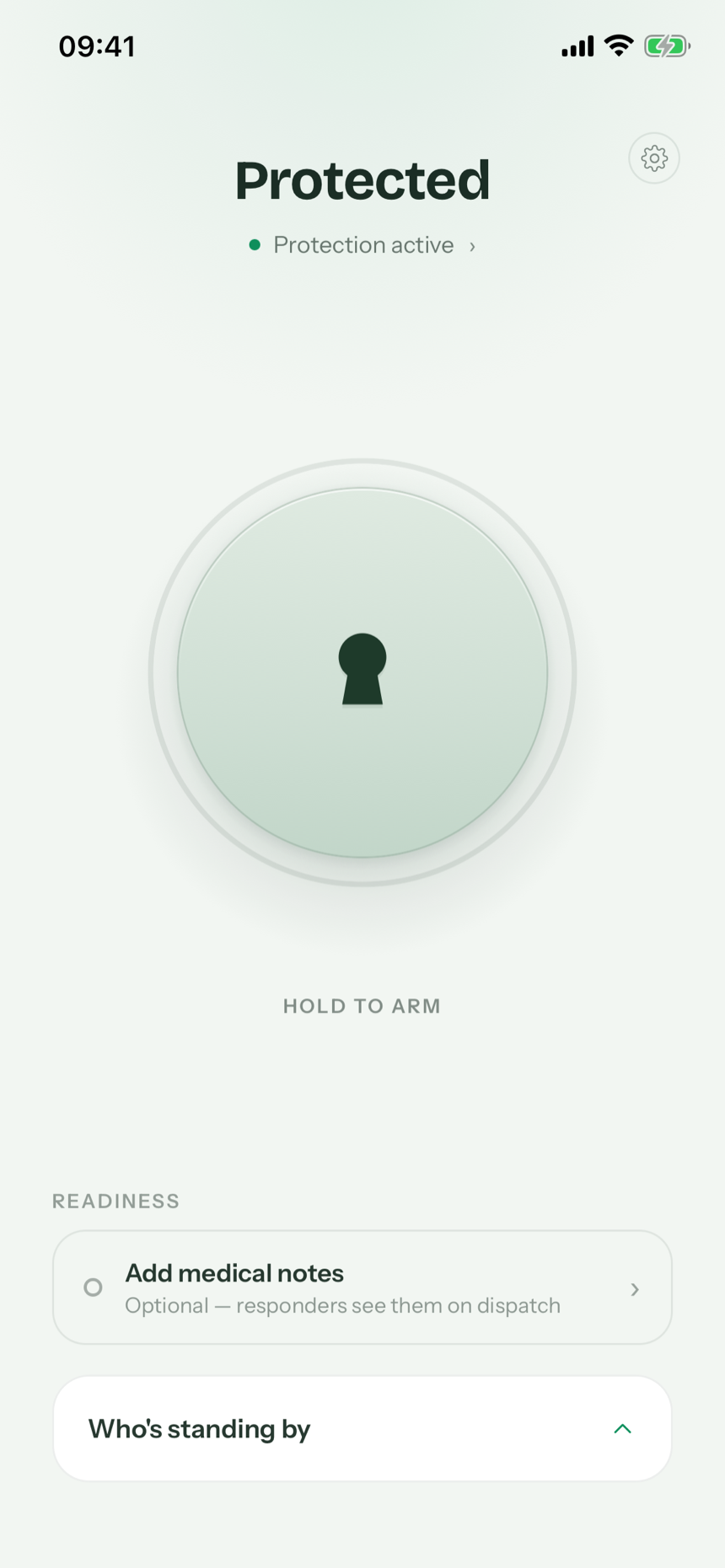
ELA home, real capture: Protected, Protection active, the disc, HOLD TO ARM, Who's standing by
The disc
is the whole app.
real screen · home — protected
t = 0:03–0:07 · bars 2–3

The dot becomes the disc

On screenThe disc is the whole app. (left, weight 400) · the real home screen: Protected · Protection active · the disc · HOLD TO ARM · Who's standing by

MotionThe dot swells (expo-out, 1.1 s) to the diameter of the home disc and cross-dissolves into the real disc: over the last 20 frames the flat forest circle fades out while the recorded disc fades in underneath it, exactly registered. Around it the real screen fades in from the canvas (the film canvas is the app canvas, so only the phone's contents appear: header, status line, label, readiness row, standing-by bar, in one 450 ms fade + 16 px rise). The bezel draws in last, as if the frame found the screen. Camera holds; no cut.

SoundDrone continues. One quiet UI settle as the screen lands (filtered noise tap).

Hand-offPush in toward the disc; a soft thumb shadow enters from the bottom right and comes to rest on it. Contact is the next shot's first frame.

BuildReal: the whole screen (home-protected.png, or the same state recorded live). Code: the swelling dot and the cross-dissolve, the phone chrome, the fade-in. Nothing on the phone is drawn.
03 · 0:07–0:10
Real ELA home disc during the live hold, label HOLD TO ARM
2s
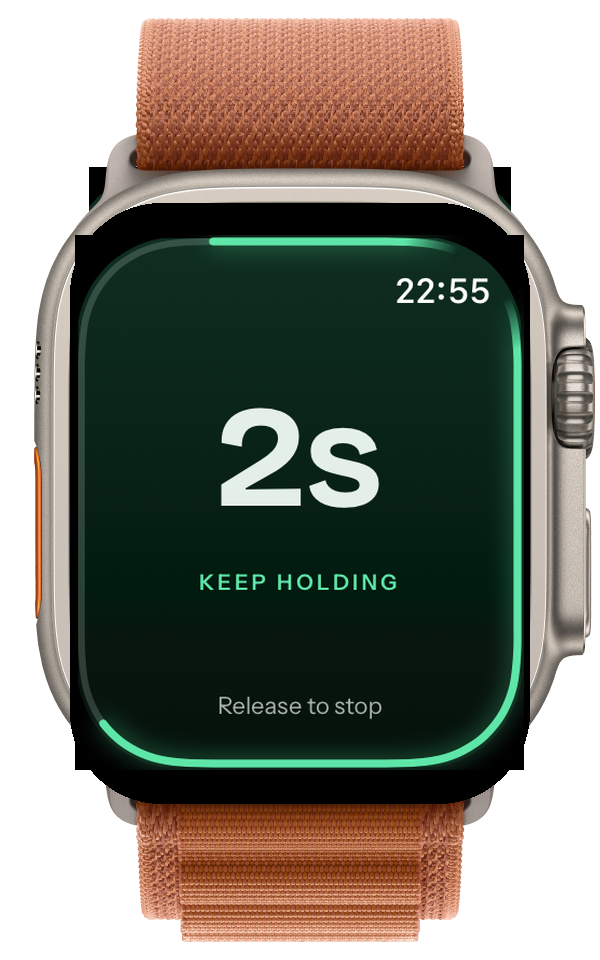
Real Apple Watch capture mirroring the hold: 2s, KEEP HOLDING, Release to stop
watch mirrors the hold
Hold.
Nothing else.
t = 0:07–0:10 · bars 3–4

Three seconds

On screenHold. Nothing else. · the real home disc, filling a third of the frame · HOLD TO ARM · mono 1s / 2s / 3s (film type) · the real watch at the right edge: 2s, KEEP HOLDING

MotionPush in on home until the live disc fills a third of the frame. On contact the app's own ring draws clockwise from twelve (recorded on the simulator, never drawn); the motif dot rides its leading edge, so the dot IS the ring's tip. The mono counter steps 1s → 2s → 3s beneath the disc. The real watch slides in from the right on the second tick and mirrors the hold. On the third tick the ring closes and the disc gives its commit.

SoundThree tuned ticks (A♭, E♭, A♭ an octave up) exactly on 0:07.5, 0:08.5, 0:09.5. The drone rises a fifth across the hold. The commit is a short low thud with a 400 ms tail.

Hand-offThe dot leaves the closed ring and drops toward the bottom of the phone as the real pre-dispatch screen takes over. No cut.

BuildReal: home's disc at rest (home-protected.png, label HOLD TO ARM); the ring mid-draw and the hold wash are recorded at build time with the force-state seed on the live home screen. The watch is holding-natural.png, uncropped, on the light canvas. Code: the dot, the counter, the push-in. Not used: hold-rehearsal.png (that is the practice screen, "PRACTICE — NOTHING IS SENT", not the live hold) and every video in assets/_pre-mint-v2-do-not-use (gold v2).

04 · 0:10–0:14
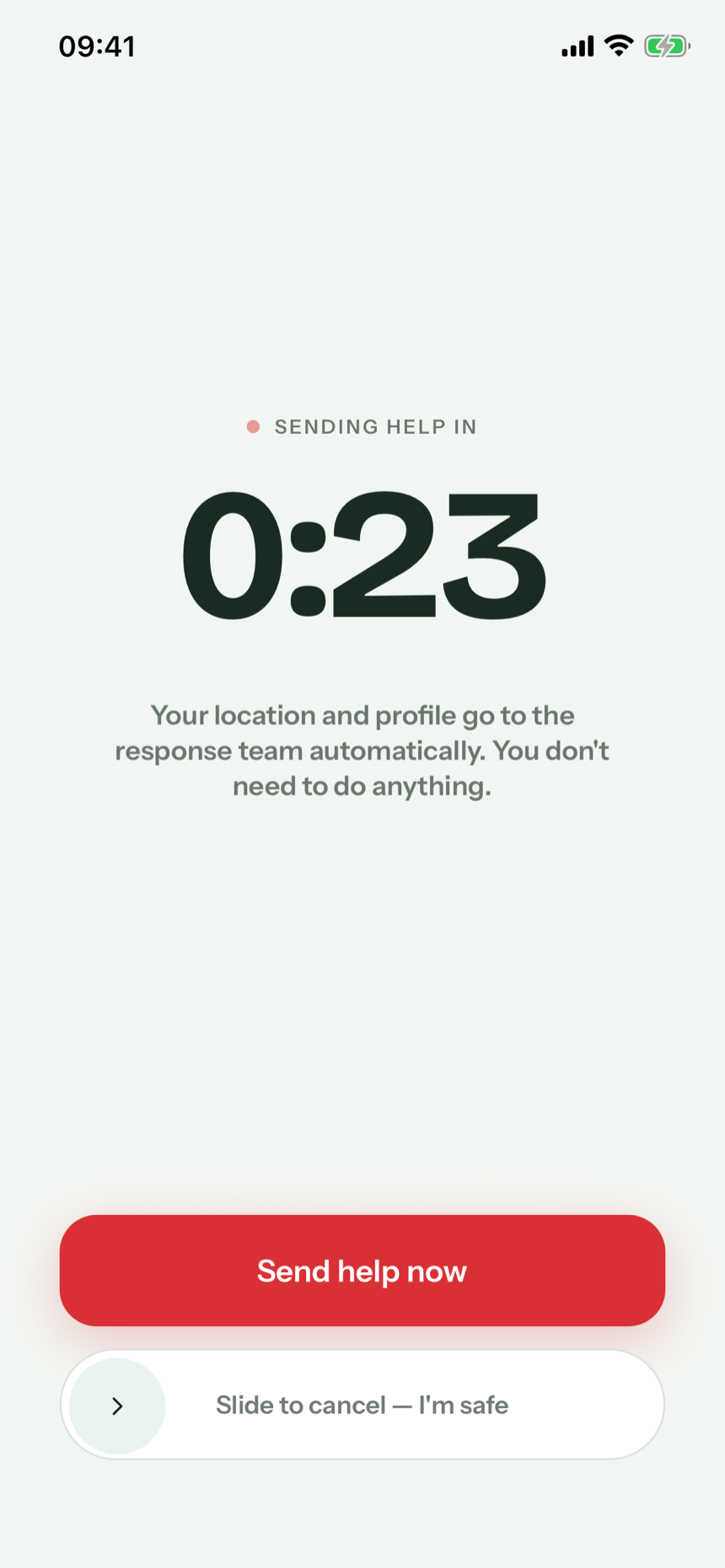
Real pre-dispatch screen: Sending help in 0:23, Send help now, Slide to cancel — I'm safe
If the moment passes,
slide "I'm safe".
If you can't, ELA sends.
real screen · sending help in 0:23 · nobody slides
t = 0:10–0:14 · bars 4–5

Countdown

On screenIf the moment passes, slide "I'm safe". If you can't, ELA sends. · the real pre-dispatch screen: SENDING HELP IN 0:23 → 0:00 · Send help now · Slide to cancel — I'm safe

MotionThe real countdown screen fills the phone; the camera settles left of centre so the copy has the right half. The dot comes to rest as the centre of the slider's thumb and stays there: nobody slides. The 30 seconds are compressed to four with a speed ramp (real time for the first two seconds, then accelerating; the timer's digits blur-step). At 0:00 the screen hands to the case and the dot lifts off the thumb.

SoundA soft metronome, one click per displayed second, that accelerates with the ramp and thins out. The red button never makes a sound. Silence for two beats before the send.

Hand-offThe dot rises up the screen and lands on the first timeline node of the case screen as it arrives. That landing is the downbeat of bar 6.

Product truthDeadman flow: the countdown sends at zero; "Slide to cancel — I'm safe" is the only stand-down; "Send help now" accelerates. The one red surface is the app's own button.

BuildReal: the whole screen (countdown.png; the live timer is recorded). Code: the dot, the speed ramp, type. The drawn countdown ring from round 1 is gone.

05 · 0:14–0:19
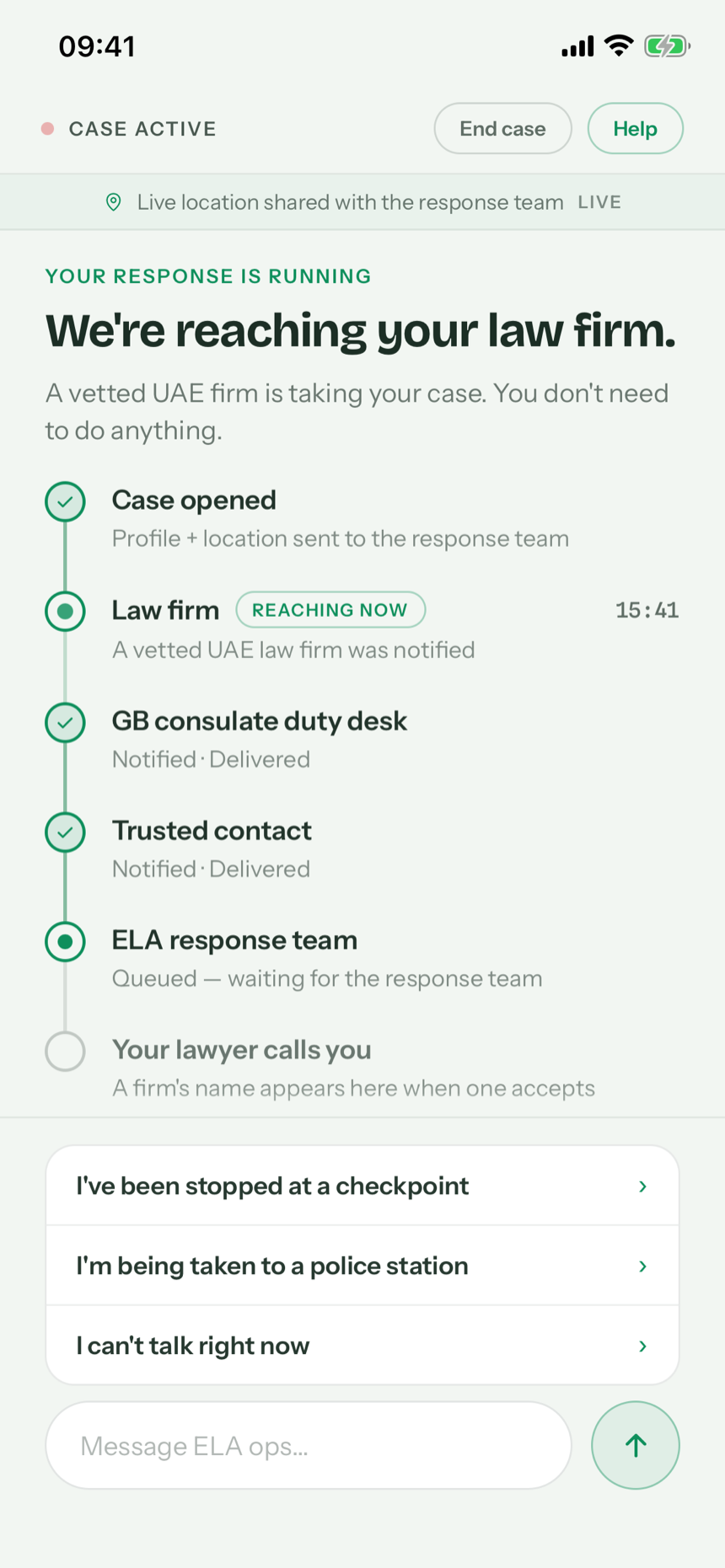
Real active case screen: We're reaching your law firm, timeline rows
rows appear here on the frame their line inks
Then the response runs without you.
A vetted law firm is notified.
Your consulate is informed.
Your family gets a private live link.
A human team tracks the case.
example timeline · actual timings vary by case
the phone shows a row the same frame its line inks — never before
t = 0:14–0:19 · bars 6–7

The response runs

On screenThen the response runs without you. · four lines that ink one per beat · the real case screen, whose rows appear in step · "EXAMPLE timeline · actual timings vary by case"

MotionThe dot lands on the law-firm node as the real "We're reaching your law firm" screen arrives with only the rows that are true at that instant (Case opened · Law firm). Each line on the right inks on its beat, and on the SAME frame the corresponding row appears on the phone (consulate desk, trusted contact, response team), revealed from a mask; the dot hops one node down the rail with each landing. The phone is never ahead of the words.

SoundOne soft pulse per landing (four), each a tone higher. Drone thins.

Hand-offThe dot leaves the last node and exits the phone toward the right edge of the frame. Where it goes is the next shot.

Copy law"Notified", "a vetted law firm", never a name, never a time promise. The real screen used is the no-firm-name state (15b).

BuildReal: the case screen, recorded state by state with the force-state seed (reaching → each row notified). Code: the dot, the lines, the reveal mask, type. No drawn rows.

06 · 0:19–0:23
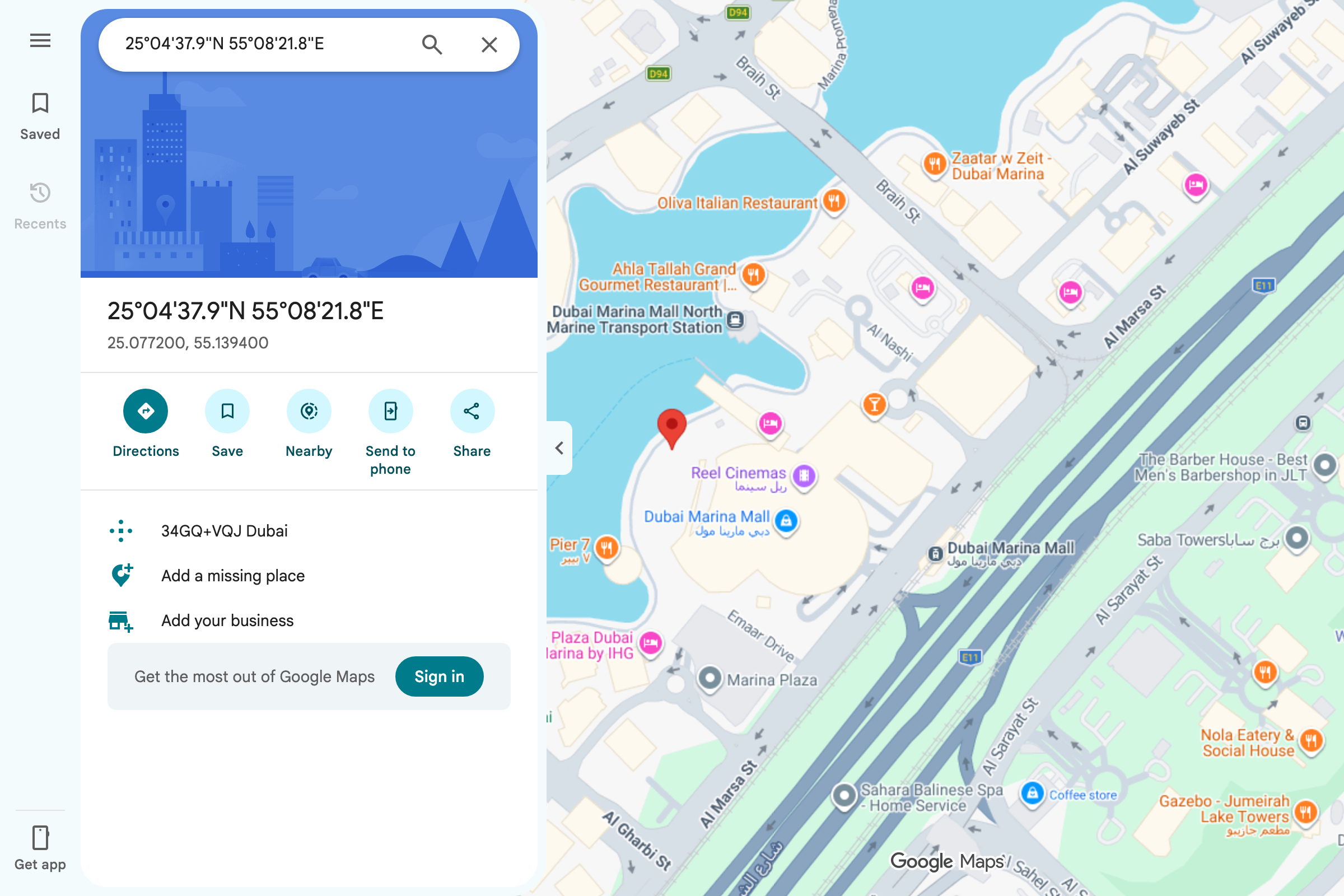
maps.google.com · opened from the private link
Real Google Maps view of Dubai Marina with the pin the family's private link opens
The people
who love you
watch help
arrive.
your trusted contacts' private link · live location · opens in Google Maps
t = 0:19–0:23 · bars 7–8

The people who love you

On screenThe people who love you watch help arrive. · a browser window: the real Google Maps view the family's private link opens, with its pin on the member's live location

MotionThe dot flies right, and a browser window unfolds around it. The dot drops onto the map at the member's coordinates, and Google's own pin drops at that spot the way it does in Maps; the dot stays at the pin's foot. The camera drifts slowly across the real map for two bars. This is exactly what a trusted contact sees: the private link's case status offers "Open in Google Maps", and this is that view.

SoundThe drone opens up (a major third added). No red pulse: the only red in this frame is Google's pin.

Hand-offThe window recedes into the distance; the dot detaches and rises toward the top third of the frame. It is heading for the lockup.

BuildReal: the Google Maps capture (google-maps-dubai-marina-pin.png; re-captured at build time at the exact example coordinates, attribution always in frame, imagery never altered). Code: the dot, the browser chrome, the camera drift. The family's own case-status page is not shown: it is still on the old gold-on-ink theme and has no map.

07 · 0:23–0:27
Everything else
is ours now.
t = 0:23–0:27 · bars 9–10

Ours now

On screenEverything else is ours now.

MotionThe map window is gone; only the light canvas remains. The two lines set in Bricolage 300 at 96 pt arrive from a soft blur, one line per beat. The dot settles beneath them as their full stop, ticks twice (scale breath), then the keyhole body draws downward from it: the dot is the keyhole's circle. The mark fades from 35 % to full as the body completes.

SoundThe resolve chord (I after the IV–V that ran under the map), held. Two dry ticks as the dot breathes.

Hand-offThe copy tucks upward out of frame; the completed mark slides left as "ELA" slides out from behind it. That is the lockup.

BuildCode: type, dot, the brand mark (the mark is brand, not product UI).

08 · 0:27–0:31
ELA
Coming soon to iPhone & Apple Watch
ela.now
ELA is a membership service, not an emergency service. In immediate danger, call 999.
Screens show how the service works; they are not a guarantee of any outcome.
t = 0:27–0:31 · bar 11 + 1 s hold

Lockup

On screenkeyhole + ELA · Coming soon to iPhone & Apple Watch · ela.now · small print (two lines)

MotionMark and wordmark lock centre. The URL fades up in mono. The small print fades up last and stays. Hold one second on the final frame; the dot inside the mark breathes once more.

SoundThe chord decays under a final tick-tock (the two dry ticks from the open, now an octave lower). Silence for the last 500 ms.

Hand-offNone. The film ends where it started: on the dot.

Build notes · A · Relay

Real vs code (round 2: no drawn product UI anywhere)

FrameReal recorded screenCode in Remotion
01—dot, type
02home — protected (home-protected.png / live recording)the swelling dot and its cross-dissolve into the real disc, phone chrome, fade-in
03home's live disc (home-protected.png at rest, HOLD TO ARM; the ring mid-draw recorded at build time) · watch holding-natural.png uncroppeddot on the ring's tip, counter, push-in
04pre-dispatch countdown (countdown.png / live timer)dot on the slider thumb, speed ramp, type
0515b reaching-your-law-firm, recorded state by state (no firm name)dot on the nodes, the four lines, the reveal mask
06Google Maps at the example coordinates (google-maps-dubai-marina-pin.png)dot, browser chrome, camera drift
07–08—type, brand mark, lockup, small print

Asset warnings

Beat grid and sync cues

Discipline